Dental notes,
done while you treat.
Leveret is the clinical documentation platform built for dentists. Record the appointment and your template fills itself, or click through it yourself. Then turn the note into referrals and letters, check the radiograph with Dental AI, and ask Buddy for the rest.
Keep your hands on the patient, not the keyboard.
Press record once at the start of the appointment. Live auto-fill listens to you, your nurse and your patient, picks the right options in your template and writes the free text as the appointment happens. Prefer to click? Every field works by hand too.
Clinical Examination
Recording
Capture audio
- DentistCold lingers on that one.
- DentistThere's distal decay, close to the pulp.
-
Live auto-fill
Options are selected and free-text fields are written while you talk, so the note is finished when the patient leaves the chair.
-
Gloves stay on
No typing between steps and no catching up at lunch. Examine, discuss and treat. The documentation keeps pace.
-
Speaks dentistry
Tooth notation in FDI, Palmer, Universal or Haderup, test results and treatment terms, charted in the shorthand you would write yourself.
-
You sign off
Every field stays editable. Review the notes summary, change anything, then complete the note.
Templates that chart the way you already do.
Voice fills the template, and the template is yours. Start from the library of dental note templates or build your own in the note editor, field by field, and Leveret follows its structure every time.
-
A library to start from
Check-ups, whitening consults, periodontal and implant assessments, ready to use on day one and easy to adapt.
-
Built your way
Add fields, rename labels, drag to reorder, and choose option buttons or free text for each line. Reusable blocks fill in the details you repeat, like your nurse, anaesthetic and clinician name.
-
Skip what you don't need
Short appointment? Skip the remaining lines of a section and the note stays clean.
-
Referrals and letters from the note
Generate referral letters, treatment plans, consent forms and dental reports from what you've charted, then finish them in the document editor on your practice letterhead.
A few from the library
- Routine examination
- Whitening consult
- Implant assessment
- Periodontal assessment
- Implant consultation
- Basic dental exam
- Referral letter
- Treatment plan
- Consent form
- Dental report
Charts in your notation, wherever you practise.
Leveret supports Palmer, FDI, Universal and Haderup. Choose one in settings and the tooth picker, your notes and your letters all follow it. Pick a tooth, add the surfaces, and it goes straight into the line.
Clinical Examination
NotationPalmer
The lower left first molar in each system
- Palmer
- 6LL6
- United Kingdom, as a quadrant grid or shorthand like LL6
- FDI ISO 3950
- 36
- International, the most widely used system
- Universal ADA
- 19
- United States, teeth numbered 1 to 32
- Victor Haderup
- 6−
- Scandinavia, plus for upper and minus for lower
-
NHS UDA bands, detected
Working in NHS dentistry? After each recording, Leveret detects the UDA band (1, 2 or 3) from the treatments in the note.
-
In your language
Use Leveret in English (UK), French, German or Spanish, and keep your own clinical shorthand in every template.
Dental AI Beta
A second look at every radiograph.
Upload a panoramic (OPG) or periapical radiograph, or capture it from your imaging software with a screenshot. Choose the Panoramic Analyser (the Dental OPG model) or the Periapical Detector (the Periapical Model). Dental AI marks what it finds, adds it to the note, and keeps a history of every scan.
Panoramic Analyser Dental OPG model
Loading film
The radiograph shown is an illustration. Dental AI supports your clinical judgement. It does not replace it.
The rest of the day, handled in the same place.
Clinical Examination
Perio Calculator BSP 2017
Patient age
Worst interproximal bone loss 0%
Pattern
Molar-Incisor<30%≥30%
Stability indicators
Bleeding on probing ≥ 10% No
Deepest pocket ≥ 5mm No
BOP in pockets ≥ 4mm No
Calculate
Generalised periodontitis
Stage III, Grade B Currently unstable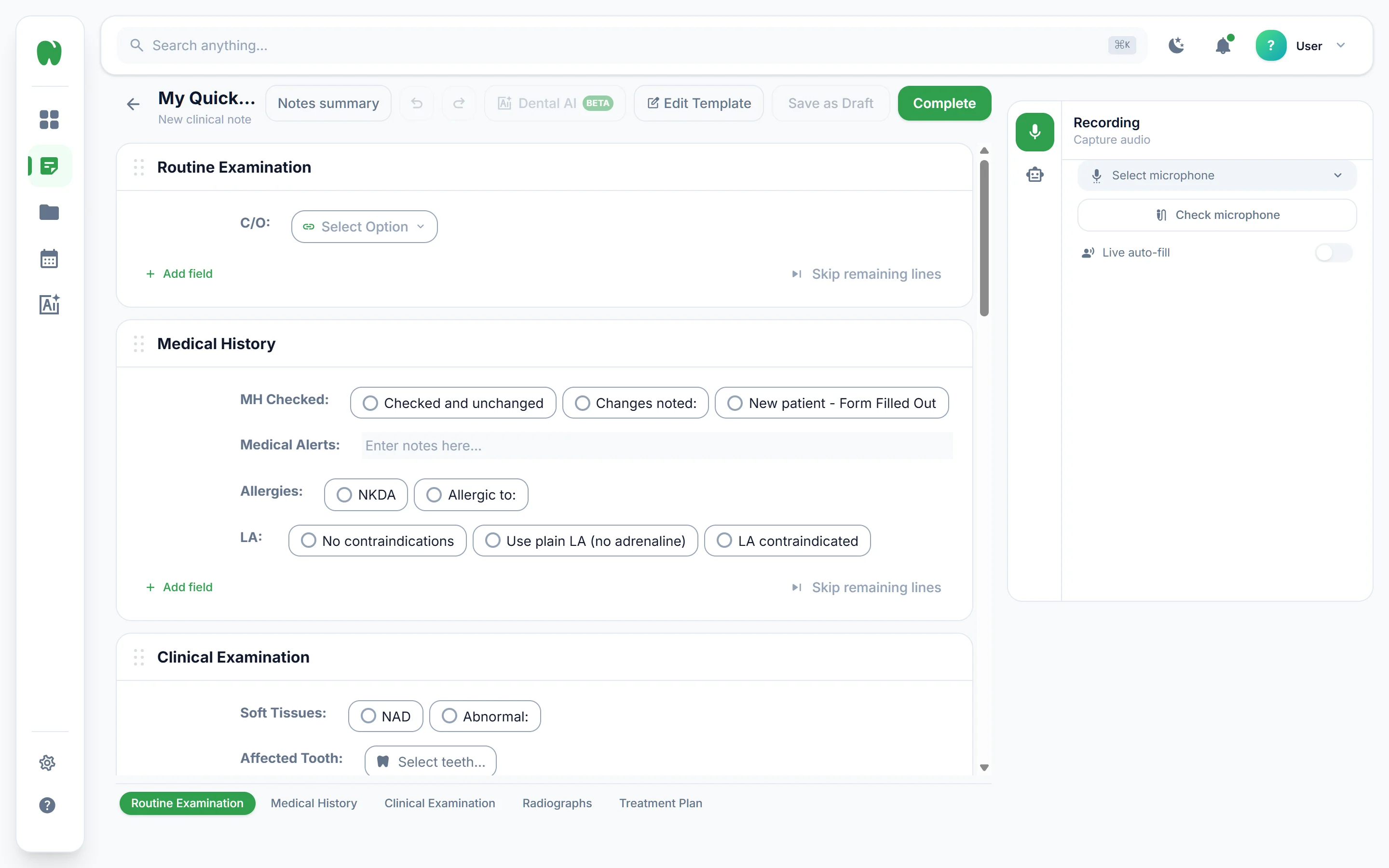
From the chair to a completed note.
-
Pick a template
Choose one from the library or one you've built. The appointment type decides the structure of the note.
-
Press record and treat
Talk the way you normally do. Live auto-fill charts the appointment as it happens, hands-free.
-
Review and complete
Check the notes summary, change anything with one click, then copy it into your practice management software.
Questions dentists ask us.
Something else on your mind? Email [email protected] or read our privacy policy.
What is Leveret AI?
Leveret is a clinical documentation platform for dentists and dental teams. Record the appointment and live auto-fill selects the options in your note template and writes the free text, or fill it in by hand. From the note you can generate referral letters and other documents, analyse panoramic and periapical radiographs with Dental AI, and ask Leveret Buddy to change fields or run the perio calculator.
Who can use Leveret?
Leveret is built for qualified dental professionals and the staff who work under their supervision, such as dentists, hygienists, therapists and dental nurses.
Does Leveret store patient records?
No. Leveret is a documentation tool, not a patient records system. Completed notes and documents belong to you and should be saved in your own practice management software.
Is my clinical content used to train AI models?
No. Clinical content and any patient-related input you enter is never used to train AI models.
Where is data stored and how is it protected?
Data is stored and processed in the UK and EEA, encrypted in transit and at rest. Leveret AI Ltd is committed to complying with UK GDPR and the Data Protection Act 2018.
What can Dental AI detect on a radiograph?
Dental AI has two models. The Panoramic Analyser, also called the Dental OPG model, looks for caries, periapical pathology, bone loss and impacted teeth on panoramic (OPG) radiographs. The Periapical Detector, also called the Periapical Model, looks at periapical lesions, root morphology and how close caries is to the pulp. Dental AI is in beta and supports your clinical judgement. It does not replace it.
Can I use my own note templates?
Yes. Start from the template library or build your own. Add fields, rename labels, reorder them, and choose option buttons or free text for each line. Voice documentation fills whichever template you pick.
Which tooth notation systems does Leveret support?
Leveret supports FDI (ISO 3950), Palmer, Universal (ADA) and Victor Haderup notation. Choose one in settings and tooth numbers in your notes follow it. You can also show plain names such as “lower left first molar” instead of codes.
Can dentists outside the UK use Leveret?
Yes. Leveret supports the notation systems used in the UK, internationally, in the United States and in Scandinavia, and the interface is available in English (UK), French, German and Spanish. Leveret AI Ltd is based in the UK and data is stored in the UK and EEA.
Does Leveret help with NHS UDA bands?
Yes. Turn on the UDA band indicator and, after each recording, Leveret detects the NHS UDA band (1, 2 or 3) from the treatments filled in.
Does Leveret work with my practice management software?
Review the notes summary when you finish, then copy it into your practice management software in one click.

Finish your notes before the next patient sits down.
Set up your templates, record your first appointment and watch the note fill itself.